How Outperform Handles Your Leads: A Quick User Guide
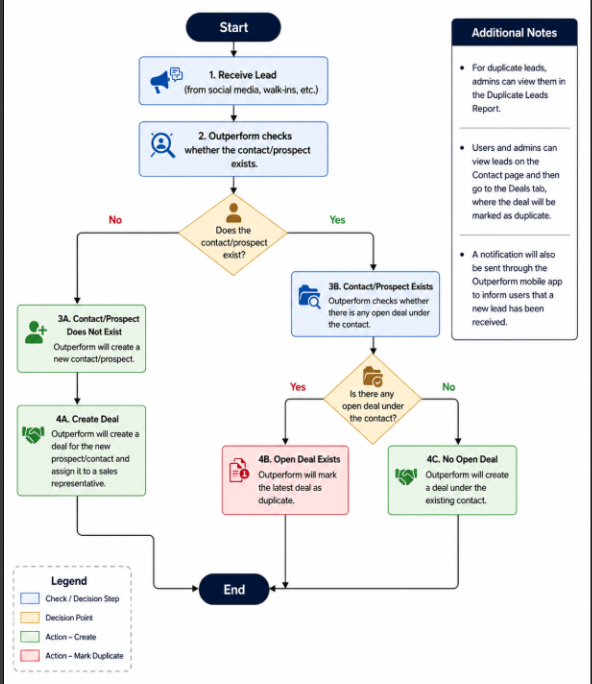
Outperform automatically manages your incoming leads—whether from social media, website forms, property listing or web forms—so you don’t have to manually check for duplicates or worry about lost contacts.
How Incoming Leads Are Processed
Brand New Prospect
What happens: Outperform doesn’t find an existing record.
System Action: It creates a new Contact, opens a new Deal, and automatically assigns it to a sales representative.
Existing Prospect (No Active Deals)
What happens: Outperform finds the Contact in your system, but they don’t have any ongoing deals.
System Action: It attaches a brand-new Deal directly to their existing Contact profile.
Existing Prospect (Already Has an Open Deal)
What happens: Outperform finds the Contact and sees they already have an active, open deal in progress.
System Action: It marks the new incoming deal as a Duplicate to keep your sales pipeline clean and avoid redundant follow-ups.
Key Features & Notifications
Mobile App Alerts: Whenever a new lead is assigned to you, Outperform sends an instant push notification directly through the Outperform mobile app.
Checking Deal Status: You can view lead details by navigating to the Contact Page and clicking on the Deals tab. Any flagged duplicate deals will be explicitly labeled here.
Admin Duplicate Reports: System administrators can track and manage all flagged duplicates in one place using the Duplicate Leads Report.